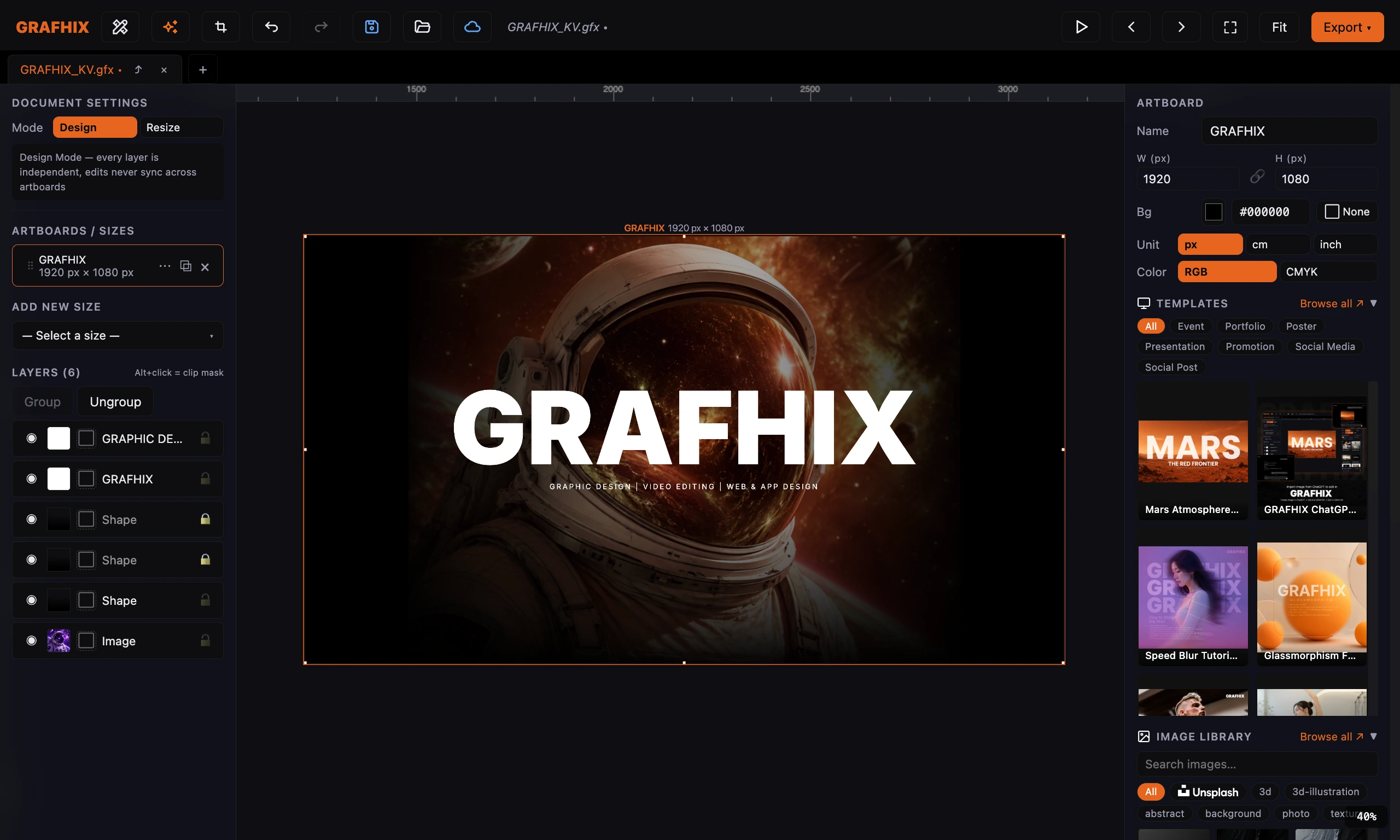
GRAPHIC DESIGN | VIDEO EDITING | WEB & APP DESIGN
Design AnythingYou Imagine
All-in-one design tool.
Features
Everything in One Place
Layout, retouch, cut backgrounds, video editing, web app design — export as HTML with CSS.
Multi-Artboard — Design & Resize
Create multiple artboard sizes in a single project — from social media to A4 print. Switch between Design Mode and Resize Mode instantly.
Design · Resize Mode
Color Picker — All Modes
Pick colors in HEX, RGB, HSL, or CMYK from the same color picker. Supports Linear Gradient Fill and multiple Blend Modes per layer.
HEX · RGB · HSL · CMYK
PDF Export (CMYK)
Export high-quality PDFs at 300 dpi with CMYK color profile. Supports transparency, gradients, and embedded images — print-ready, no conversion needed.
300 dpi · Print Ready
Video Layer + Trim & Split
Import MP4/MOV/WebM as layers. Trim in/out with Timeline Handles, Split clips at any point. Control audio, Loop, and export with graphic overlays as MP4.
Trim · Split · MP4
HTML Export — Self-contained
Export artboards as a single, ready-to-use HTML file. Fonts, images, and video are all embedded — no dependencies. Hand off to developers or host directly.
Self-contained · No dependencies
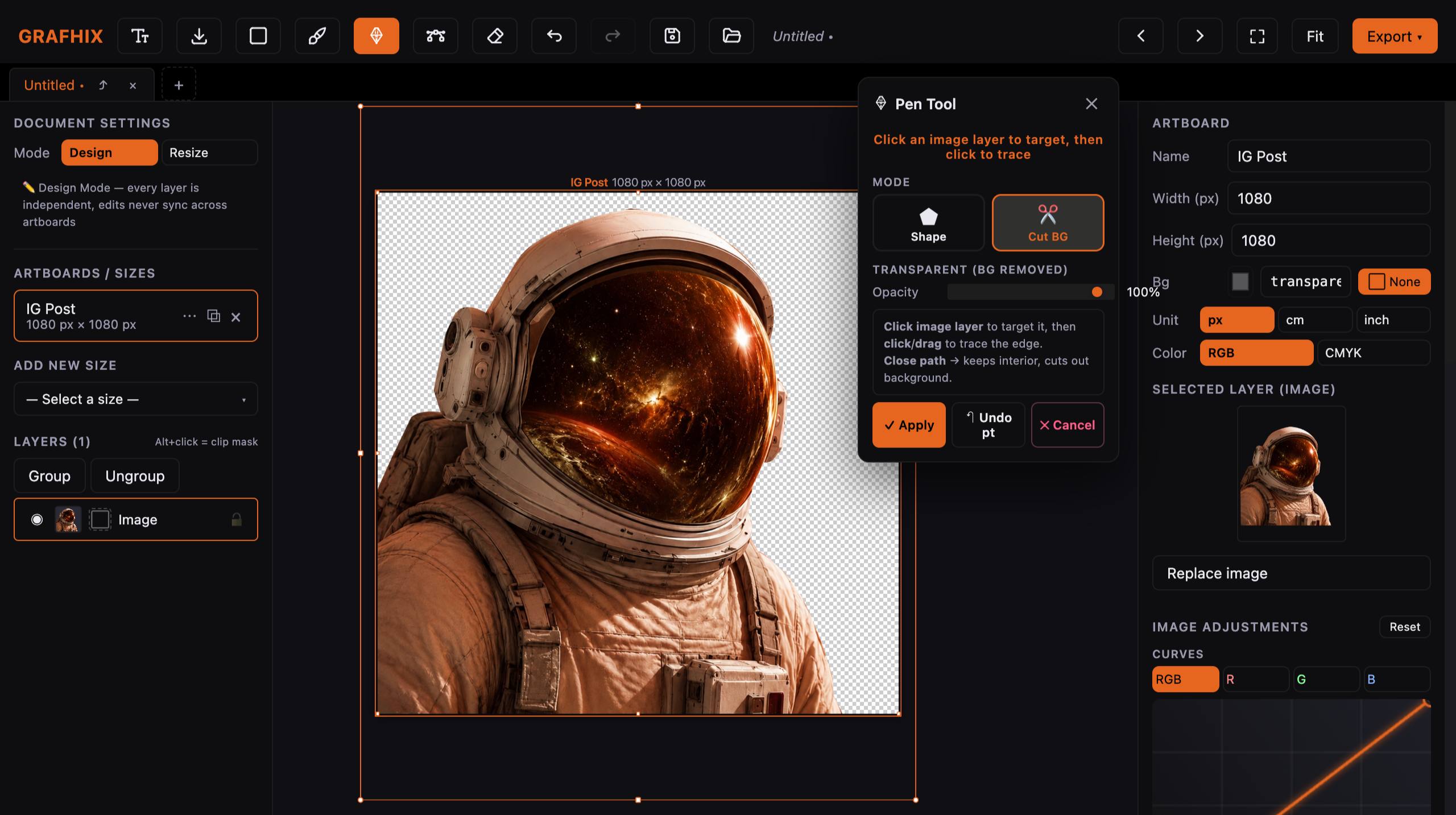
Pen Tool — Draw & Cut Background
Draw Bezier paths by placing anchor points and dragging handles for curves — create vector shapes or cut image backgrounds with precision path masking.
Bezier · Shape · Cut BG
Brush Tool — Hard · Soft · Spray
Paint freely on canvas with 3 brush types: Hard Edge, Soft/Feathered, and Spray Scatter. Adjust size, opacity, and color in real-time — Flatten to layer instantly.
Hard · Soft · Spray
Object Removal Tool
Paint a mask over unwanted objects using Brush or Pen, then press Remove — the Inpainting system fills the area seamlessly without leaving any trace.
Mask · Inpaint · Remove
Image Adjustments — Curves & Selective
Adjust Brightness, Contrast, Saturation, Hue, Exposure per RGB channel. Includes point-drag Curves and Selective Color for independent hue group control.
Curves · Selective Color
How It Works
Simple in 4 Steps
Create an Artboard
Add artboards from presets or set custom sizes in px, cm, inches. Switch between Design/Resize Mode anytime.
Design with a Full Toolkit
Add text, shapes, images, videos. Draw with Brush/Pen/Bezier, drag Node Warp, or remove objects with Object Removal.
Adjust Colors & Effects
Choose colors in HEX/RGB/HSL/CMYK. Set Gradients, Blend Modes, Curves, Selective Color — fine-tune each image element.
Export in 6 Formats
Export PNG, JPEG, PDF CMYK, HTML, HTML-ZIP, or MP4 — high-quality files ready to use in one click.
Export
Every Format Covered
Export options for every use case — print, digital, web, and video.
PDF
PDF (CMYK) — Print Ready
300 dpi · CMYK · Transparency · Print-ready
PNG
PNG / JPEG — High Quality
Alpha channel · Quality control · Export all artboards at once
HTML
HTML / HTML-ZIP — Self-contained
Fonts embedded · Video support · No externals · Dev-ready
MP4
MP4 / WebM — Video Export
Record graphic overlays · Set FPS & Resolution · MediaRecorder API
📁 ส่งออก — Campaign_v3/
feed_1080x1080.png
842 KB
↓
story_1080x1920.png
1.2 MB
↓
print_A4_cmyk.pdf
3.4 MB
↓
banner_1920x600.html
288 KB
↓
animated_banner.webm
6.1 MB
↓
campaign_v3_html.zip
1.8 MB
↓
Professional Velocity
Shortcut Matrix
Built for professional muscle memory
Esc
F1
F2
F3
F4
F5
F6
F7
F8
F9
F10
F11
F12
Del
Delete Layer
~
1
2
3
4
5
6
7
8
9
0
−
+
⌫
Tab
Canvas View
Q
W
E
R
T
Y
U
I
O
P
[
]
\
Caps
A
S
D
F
G
H
J
K
L
;
'
Enter
Shift
Z
X
C
V
B
N
M
,
.
/
Shift
fn
Ctrl
Alt
⌘
⌘
Alt
←
↑↓
Tab
Full Canvas View
R
Object Removal / Inpaint
P
Bezier Pen
A
Node Edit
V
Selection Tool
B
Brush Tool
Del
Delete Layer
⌘Z / ⌘⇧Z Undo / Redo
⌘S / ⌘⇧S Save / Save As
⌘D Duplicate ⌘C / ⌘V Copy / Paste
⌘0 Fit ⌘1 100% ⌘± Zoom ⌘] / ⌘[ Layer order
Speed is a feature.
Built for professional muscle memory.
Pricing
Choose Your Plan
One price. Every feature. No hidden fees.
Monthly
Annual Save 17%
Free
Try Pro free for 14 days
฿
0
/ month
Sign up and try for free
✓ Graphic design, video editing, web/app design ✓ Export JPG, PNG, MP4, HTML, PDF CMYK ✓ After 14 days, all file exports are locked
Start for Free
Most Popular
Pro
Complete graphic design, video editing & web app design
฿
199
/ month
≈ $5.7 USD / month
Billed monthly, cancel anytime
✓ Unlimited artboards + Design & Resize Mode ✓ Export PDF (CMYK) 300 dpi · PNG · JPEG ✓ Export HTML · HTML-ZIP · MP4 · WebM ✓ Video Layer + Trim & Split Timeline ✓ Pen Tool (Bezier · Shape · Cut BG) ✓ Object Removal Tool (Inpaint) ✓ Image Adjustments (Curves · Selective Color) ✓ Brush Tool (Hard · Soft · Spray) ✓ Color Picker HEX/RGB/HSL/CMYK + Gradient + Blend ✓ Upload custom fonts TTF/OTF
Start Free 14-Day Trial →
Frequently Asked Questions
Do I need a credit card for the 14-day trial?
+
No card required. Try Pro free for 14 days — no credit card needed. After the trial, your account automatically returns to the Free plan.
What payment methods are accepted?
+
Credit and debit cards.
Can I cancel anytime?
+
Cancel anytime. Pro access ends at the next billing cycle.
Does it work on mobile?
+
Not yet — desktop only, optimized for maximum performance. GRAFHIX plans to support mobile in the future.
Start Designing Today
Try Pro free for 14 days — no credit card required
Start for Free →
คู่มือการใช้งาน
How ToUse GRAFHIX
เรียนรู้ทุกฟีเจอร์ตั้งแต่ดีไซน์กราฟิก ตัดต่อวิดีโอ ไปจนถึงสร้าง Web/App ได้ในเครื่องมือเดียว
Esc
F1
F2
F3
F4
F5
F6
F7
F8
F9
F10
F11
F12
Del
Delete Layer
~
1
2
3
4
5
6
7
8
9
0
−
+
⌫
Tab
Canvas View
Q
W
E
R
T
Y
U
I
O
P
[
]
\
Caps
A
S
D
F
G
H
J
K
L
;
'
Enter
Shift
Z
X
C
V
B
N
M
,
.
/
Shift
fn
Ctrl
Alt
⌘
⌘
Alt
←
↑↓
Tab
Full Canvas View
R
Object Removal / Inpaint
P
Bezier Pen
A
Node Edit
V
Selection Tool
B
Brush Tool
Del
Delete Layer
⌘Z / ⌘⇧Z Undo / Redo
⌘S / ⌘⇧S Save / Save As
⌘D Duplicate ⌘C / ⌘V Copy / Paste
⌘0 Fit ⌘1 100% ⌘± Zoom ⌘] / ⌘[ Layer order
Speed is a feature.
Built for professional muscle memory.
สร้าง Artboard หลายขนาด
เปิด project แล้วกด + New Artboard ในแถบซ้าย เลือก preset หรือใส่ขนาดเอง ทุก artboard แสดงพร้อมกันบน canvas เดียว
กด + Artboard ที่ sidebar ซ้าย
เลือก preset เช่น Feed 1:1, Story 9:16 หรือกำหนดขนาด Custom
เปิด Sync เพื่อให้ layer เดียวกันซิงก์ทุก artboard
Artboard
เครื่องมือ Toolbar ทั้งหมด
เลือกเครื่องมือจาก topbar เพื่อสร้างและแก้ไข layer — แต่ละ tool มี shortcut คีย์บอร์ดสำหรับความเร็วสูงสุด
T — Text: เพิ่มข้อความ, ปรับ Font/Size/Weight/Spacing■ — Shape: Rectangle, Triangle พร้อม Fill & GradientB — Brush: วาดอิสระ (Hard / Soft / Spray)P — Pen: วาด Bezier Path หรือตัดพื้นหลังภาพA — Direct Select: ลาก Corner Node เพื่อ Warp/Skew layerR — Object Removal: วาด Mask แล้วลบวัตถุออกจากภาพ
Toolbar
Image Adjustments ระดับ Pro
ปรับสีและแสงภาพอย่างละเอียดผ่าน right panel รองรับ Curves แบบลาก Point พร้อม Selective Color แยกแต่ละกลุ่มสี Reds/Yellows/Greens/Cyans/Blues/Magentas
คลิกเลือก Image layer → เปิด Image Adjustments ที่ right panel
เลือก Channel: RGB (รวม) หรือ R / G / B แยก Channel
ปรับ Brightness, Contrast, Saturation, Hue, Exposure
ลาก Curve Points เพื่อแต่ง Tone แบบละเอียด
เปิด Selective Color → เลือกกลุ่มสีที่ต้องการแต่ง H/S/L
Curves · Selective Color
ตัวอักษรและฟอนต์
รองรับ Google Fonts ทั้งไทยและอังกฤษกว่า 20 ฟอนต์ ปรับขนาด สี น้ำหนัก ระยะห่างตัวอักษร และ line height ได้อย่างละเอียด
เลือก Text layer แล้วไปที่ panel ขวา
เลือกฟอนต์จาก dropdown (ไทย: Prompt, Kanit, Sarabun)
ปรับ Size, Weight, Color, Letter Spacing
Typography
Export ทุกรูปแบบ
Export ทุก artboard พร้อมกันผ่าน dropdown เดียว รองรับ 6 format: PNG, JPEG, MP4, HTML, HTML-ZIP, PDF CMYK — ตั้งชื่อไฟล์อัตโนมัติตาม artboard name
กด Export ▾ ที่ topbar มุมขวา
เลือก Format: PNG / JPEG / MP4 / HTML / HTML-ZIP / PDF CMYK
ตั้งค่า Quality หรือ Resolution ตามต้องการ
ไฟล์จะถูก zip และ download อัตโนมัติ
PNG · JPEG · PDF · HTML · MP4
Shortcuts ที่ควรรู้
ใช้ keyboard shortcuts เพื่อสลับ tool และทำงานได้เร็วขึ้น
Full Canvas (ซ่อน panel) Tab
💡
Pro Tip: Sync Mode เปิด Sync ที่ artboard list เพื่อให้การเปลี่ยนแปลง (เช่น สี, ข้อความ) ส่งผลต่อทุก artboard พร้อมกัน — ประหยัดเวลาในงาน campaign ที่ต้องสร้างหลายขนาด
นำเข้าไฟล์วิดีโอ
ลาก drop ไฟล์วิดีโอจากเครื่องลงบน canvas โดยตรง หรือใช้ปุ่ม Upload ที่ sidebar วิดีโอจะถูกเพิ่มเป็น layer ใหม่อัตโนมัติ
ลากไฟล์ MP4 / MOV / WebM มาวางบน canvas
หรือกด Upload ที่ sidebar แล้วเลือกไฟล์
วิดีโอจะปรากฏเป็น Video layer ใน layer list
Import
Trim วิดีโอ
ตัดต้นและปลายวิดีโอด้วย timeline bar ที่ panel ด้านล่าง ลาก handle ซ้าย-ขวาเพื่อกำหนด In/Out point ดูตัวอย่างแบบ real-time
เลือก Video layer
ลาก handle ซ้าย เพื่อตั้ง Start
ลาก handle ขวา เพื่อตั้ง End
กด Play เพื่อดูตัวอย่าง
Trim
Split วิดีโอ
แยกคลิปวิดีโอที่ตำแหน่ง playhead ปัจจุบัน ได้รับ 2 layer แยกกัน สามารถปรับ/ลบแต่ละส่วนอิสระได้ทันที
เลื่อน playhead ไปยังจุดที่ต้องการตัด
กด Split ที่ video toolbar หรือกด S
Layer ถูกแยกเป็น 2 ชิ้น ปรับแต่ละส่วนได้อิสระ
Split
วิดีโอเป็น Background
ใช้วิดีโอเป็นพื้นหลังของ artboard โดยเซ็ต layer ล่างสุด แล้วซ้อน text, shape, graphic ด้านบนได้ตามปกติ
เพิ่ม Video layer แล้วลากไปไว้ที่ ล่างสุด ใน layer list
ปรับขนาด video ให้เต็ม artboard
เพิ่ม Text / Shape layer ด้านบน — จะซ้อนทับวิดีโอ
ใช้ Opacity หรือ Blend mode บน graphic layer เพื่อเอฟเฟกต์
Background
Export MP4
Render ออกมาเป็นไฟล์ MP4 คุณภาพสูงพร้อมกราฟิกซ้อนทับทุก layer กำหนด FPS, Resolution และช่วงเวลาที่ต้องการ export ได้
กด Export ที่ topbar
เลือก Format: MP4 (Video)
ตั้ง Resolution, FPS (แนะนำ 30fps)
กด Render & Download
Export MP4
เสียงและ Timeline
จัดการ audio track ที่มากับวิดีโอ ปรับ Volume หรือ Mute ได้ที่ panel ขวา ดู timeline ภาพรวมทุก layer ในแถบด้านล่าง
เลือก Video layer → panel ขวา มี Volume slider
กด Mute icon เพื่อปิดเสียงชั่วคราว
Timeline bar แสดงทุก video layer พร้อมกัน
Audio
Import ลากวิดีโอลงบน canvas
Trim / Split ตัดคลิปผ่าน timeline bar
เพิ่ม Graphic ซ้อน text/shape ด้านบน
Preview กด Play ดูก่อน export
Export MP4 Render และ download
💡
Pro Tip: Loop Background ตั้ง video layer เป็น Loop ที่ panel ขวาเพื่อให้วิดีโอ background วนซ้ำอัตโนมัติ เหมาะสำหรับ motion graphic ที่ต้องการความยาวกว่า clip ต้นฉบับ
ออกแบบ Web/App UI
ใช้ artboard ขนาด Desktop (1440px), Tablet (768px) หรือ Mobile (375px) เป็น frame ออกแบบ layout พร้อม grid system มาตรฐานเว็บ
สร้าง Artboard ใหม่ เลือก preset: Desktop / Tablet / Mobile
เปิด Grid จาก View menu (12-col grid)
ออกแบบ UI ด้วย shape, text, image ตามปกติ
UI Design
ใส่ลิงค์ใน Element
กำหนด URL ให้กับ element ใดก็ได้ เมื่อ export เป็น HTML องค์ประกอบนั้นจะกลายเป็น <a href="..."> อัตโนมัติ รองรับ external และ internal link
เลือก element ที่ต้องการใส่ลิงค์
ที่ panel ขวา เปิด tab Link
ใส่ URL เช่น https://example.com หรือ #section
ตั้ง target: Same tab / New tab
Hyperlink
Export เป็น HTML
แปลง artboard ทั้งหน้าเป็นไฟล์ HTML ที่ใช้งานได้จริง โครงสร้าง element ถูก map ตาม layer hierarchy พร้อม class name อ่านออกได้
กด Export → เลือก HTML
ตั้งชื่อไฟล์และ output folder
กด Export HTML — ได้ไฟล์ .html พร้อมใช้
เปิดในเบราว์เซอร์ หรือส่งต่อให้ dev ได้เลย
HTML Export
CSS อยู่ในไฟล์เดียว
CSS ทั้งหมดถูก inline ไว้ใน <style> tag ในไฟล์เดียว ไม่ต้องจัดการหลายไฟล์ พร้อม dev ต่อทันที — ตำแหน่งและขนาดมาจาก design values จริง
CSS ถูก generate อัตโนมัติจาก position/size ของแต่ละ layer
เปิดใน code editor แก้ CSS ต่อได้เลย
Responsive layout ต้องเพิ่ม media query เองหลัง export
CSS
ออกแบบหลายขนาดบน Canvas เดียว
สร้าง artboard แยกสำหรับแต่ละ viewport เช่น Desktop (1920px), Tablet (768px), Mobile (375px) — ดูเปรียบเทียบทุกขนาดพร้อมกันบน canvas เดียวได้ทันที ไม่มี auto-sync ระหว่างขนาด
กด + Artboard → ใส่ขนาด Desktop / Tablet / Mobile แยกกัน
ออกแบบแต่ละขนาดอิสระบน canvas เดียวกัน
Zoom out เพื่อดูภาพรวมทุก artboard เปรียบเทียบกัน
Export แต่ละ artboard เป็น HTML แยกไฟล์ได้เลย
Multi-Viewport
ส่งต่อให้ Developer
ไฟล์ HTML+CSS ที่ได้สามารถนำไปเปิดใน VS Code หรืออัปโหลดขึ้น hosting ได้ทันที เหมาะสำหรับ prototype และ production starter
CSS inline ใน <style> embedded
Handoff
ออกแบบ UI วาง element บน artboard
ตั้งชื่อ Layer ชื่อ layer = class CSS
ใส่ Link กำหนด URL ใน panel
Export HTML ได้ไฟล์เดียว complete
Dev ต่อ เปิดใน editor แก้ได้เลย
💡
Pro Tip: ตั้งชื่อ Layer ให้ดี = CSS ที่ดี ตั้งชื่อ layer เป็น semantic name เช่น hero-title, nav-link, card-container — ชื่อเหล่านี้จะกลายเป็น CSS class name ทำให้โค้ดที่ export ออกมาอ่านง่ายและแก้ไขต่อได้สะดวก